---
title: HTML elements
url: "https://www.toujou.com/service/element-library/html/html-elements/"
date: 2019-08-01
modified: 2026-01-16
---
# HTML elements
1. [Home](https://www.toujou.de/)
2. [Service](https://www.toujou.de/service/)
3. [Element library](https://www.toujou.de/service/element-library/)
4. [HTML](https://www.toujou.de/service/element-library/html/)
5. [HTML elements](https://www.toujou.de/service/element-library/html/html-elements/)
HTML
====
Try out your programming skills with our HTML elements, optionally with text.
Item IDs: 07-005 \| 07-006 \| 07-012 \| 07-013 \| 07-014 \| 07-015 \| 07-016 \| 07-017 \| 07-018 \| 07-019 \| 07-020 \| 07-021
[Sample views](#c1006524) [Step by step guide](#c1006529)
---
Sample views
--------------
### HTML grid width
### HTML with Text (left, 33%)
Organic pickled try-hard bespoke literally paleo skateboard neutra activated charcoal edison bulb quinoa. Chambray chartreuse shaman, brooklyn swag chicharrones microdosing. Gastropub keytar cold-pressed, intelligentsia kickstarter chicharrones etsy succulents.
---
Step by step guide
--------------------
[ 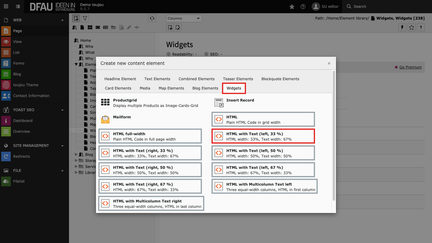 ](https://www.toujou.de/fileadmin/toujou/element_library/07_Widgets/05_HTML/05-01_HTML-Element-waehlen.png) ### Create HTML element
- Click on the **+Content** button to create an HTML element.
- Select the HTML element of your choice in the *Widgets* tab.
[ 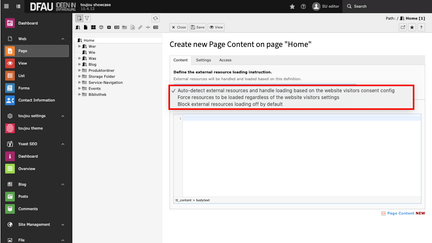 ](https://www.toujou.de/fileadmin/toujou/element_library/07_Widgets/05_HTML/05-02_HTML_Consenteinstellung_bestimmen_en.png) ### Select consent settings
- Choose your desired consent settings in the *drop-down menu*.
- For displaying the external content according to the website user settings, select the first option (recommended), for displaying the content regardless of the visitor settings, select the middle option, and for blocking all external content by default, select the bottom option.
[ 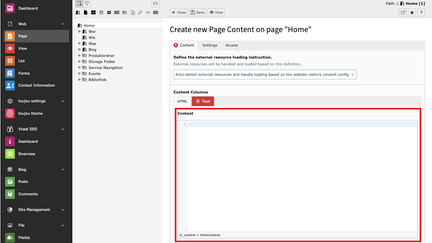 ](https://www.toujou.de/fileadmin/toujou/element_library/07_Widgets/05_HTML/05-03_HTML-Code_einfuegen_en.png) ### Insert HTML code
- In the *Content* editor, write HTML directly or insert an external code.
[ 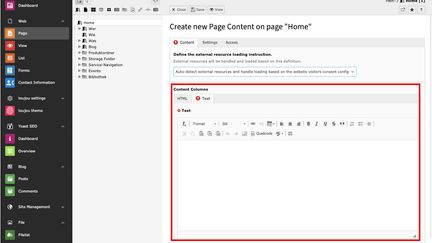 ](https://www.toujou.de/fileadmin/toujou/element_library/07_Widgets/05_HTML/05-04_Text_einfuegen_en.png) ### Insert and format text
- If the chosen element allows, select the *Text* tab. Paste your text into the editor.
- If you copy the text from another file, pay attention to possibly copied formatting.
- The text can be formatted directly within the rich text editor, with the help of the menu above the editor.
---