---
title: Code block – a toujou element for syntax highlighting
url: "https://www.toujou.com/service/element-library/widgets/code-block/"
description: Code block for syntax highlighting on the website. Manual, sample view and advices for this toujou element.
date: 2022-11-09
modified: 2022-11-10
---
# Code block – a toujou element for syntax highlighting
1. [Home](https://www.toujou.de/)
2. [Service](https://www.toujou.de/service/)
3. [Element library](https://www.toujou.de/service/element-library/)
4. [Widgets](https://www.toujou.de/service/element-library/widgets/)
5. [Code Block](https://www.toujou.de/service/element-library/widgets/code-block/)
Code block
==========
The code block is especially useful for website owners who want to present technical documentation and want therefore to use syntax highlighting. The element allows users in toujou to display a manually stored code snippet in such a way that it will remind developers at their familiar environment. this leads your technical documentation to more authenticity.
[Sample view](#c1014280) [Manual](#c1014277) [Pieces of advice](#c1014274)
---
Sample view
-----------
```
```
const test = "This is a variable";
function add (a,b) {
return a + b;
}
```
```
javascript Manual
--------
[ 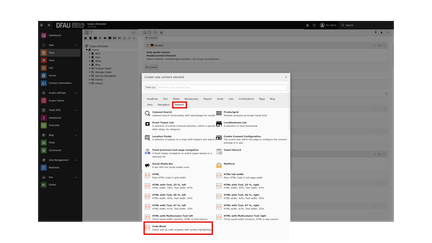 ](https://www.toujou.de/fileadmin/toujou/element_library/07_Widgets/13_code_block/Code-block-chooose-element.png) ### Create a code block
- After clicking **+ Content** in the content area of your page, the element selection pop-up window will appear. Select the **Widgets** tab and then choose **Code block**.
[ 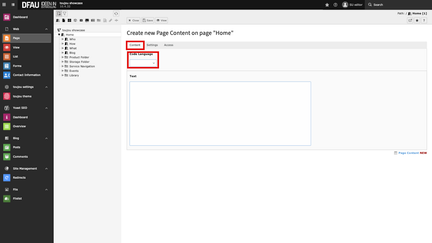 ](https://www.toujou.de/fileadmin/toujou/element_library/07_Widgets/13_code_block/Codeblock-choose-code.png) ### Select your code language (optional)
- Select the desired code language from the diverse options. Click the **drop-down menu** in the *Code Language* within the *Content* tab. The options include CSS, HTML, JSON, and many others.
[ 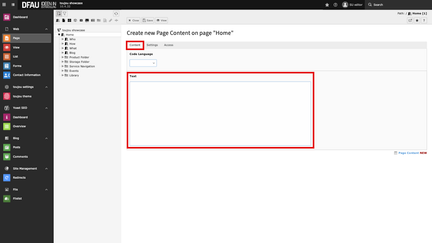 ](https://www.toujou.de/fileadmin/toujou/element_library/07_Widgets/13_code_block/Codeblock-edit-code.png) ### Enter your code
- Enter the respective code in the*Text* field within the *Content* tab. Save your settings.
- Be aware: The code will not be checked by toujou. Therefore, make sure you spell it correctly for your documentation.
---
Pieces of advice
------------------
**Worth noting**: The Code Block element is by default displayed with a black background in toujou. For a different background color, please contact our [service team](mailto:service@toujou.de). Please note that the element is just used to illustrate the code snippet in terms of syntax highlighting. There is no automatic check of the entered code in the text field and, also, it has no effect on the page.
---
Linked tutorials
----------------
Tutorials related to this element.
[Edit pages](https://www.toujou.de/service/tutorials/pages-navigation/) [element library](https://www.toujou.de/service/element-library/)
---