---
title: "Tutorials: Edit the source code within the TYPO3 RTE – this is toujou."
url: "https://www.toujou.com/service/tutorials/page-content/text-editing/source-code/"
description: "For troubleshooting and advanced text editing, we'll explain how to edit text within the source code in TYPO3's Rich Text Editor."
date: 2019-03-26
modified: 2022-09-27
---

# Tutorials: Edit the source code within the TYPO3 RTE – this is toujou.

1. [Home](https://www.toujou.de/)
2. [Service](https://www.toujou.de/service/)
3. [Tutorials](https://www.toujou.de/service/tutorials/)
4. [Content editing](https://www.toujou.de/service/tutorials/page-content/)
5. [Text editing](https://www.toujou.de/service/tutorials/page-content/text-editing/)
6. [Source code](https://www.toujou.de/service/tutorials/page-content/text-editing/source-code/)

   Handling the source code in the RTE
===================================

Editing the source code within the rich text editor (RTE) is for **troubleshooting only** in the rare case that the text you insert should be different than expected in the front end. There should be no reason to insert your own code under normal circumstances.

[Step by step guide](#c1005226) [Sample applications](#c1005228)

---

 Manual
------

     [ ![](https://www.toujou.de/_assets/processed/YJEl33dFhCMG8zMJqhyBhWJR19e6Y6M4rm9JiqzOnwg/q:85/w:433/h:271/fn:Y3NtX0VOXzAwX1F1ZWxsdGV4dF9hdWZydWZlbl83ZWIyYmZkMmJj:t/cb:b62e408679863a50a43beb1eee7c49897e98b4b0/bG9jYWw6L2ZpbGVhZG1pbi90b3Vqb3UvdHV0b3JpYWxzLzA2X3BhZ2UvUXVlbGx0ZXh0L0VuZ2xpc2gvRU5fMDBfUXVlbGx0ZXh0X2F1ZnJ1ZmVuLnBuZw) ](https://www.toujou.de/_assets/processed/AfTs3vuLxbNfx1CGkG1PivPLNxJ6qSQpYb0Mue6Txzg/q:85/w:1024/h:640/fn:Y3NtX0VOXzAwX1F1ZWxsdGV4dF9hdWZydWZlbl9mNWQ2MDI0ZGRh:t/cb:b62e408679863a50a43beb1eee7c49897e98b4b0/bG9jYWw6L2ZpbGVhZG1pbi90b3Vqb3UvdHV0b3JpYWxzLzA2X3BhZ2UvUXVlbGx0ZXh0L0VuZ2xpc2gvRU5fMDBfUXVlbGx0ZXh0X2F1ZnJ1ZmVuLnBuZw) ### View source code

- Within the rich text editor, you can view the HTML source code.
- After clicking on the **Source** button you will see the source code within the editor
- All other functions of the RTE are not available until you click on the **Source** button again.

 ---

 Sample applications
-------------------

 ### HTML soft hyphen *&shy;*

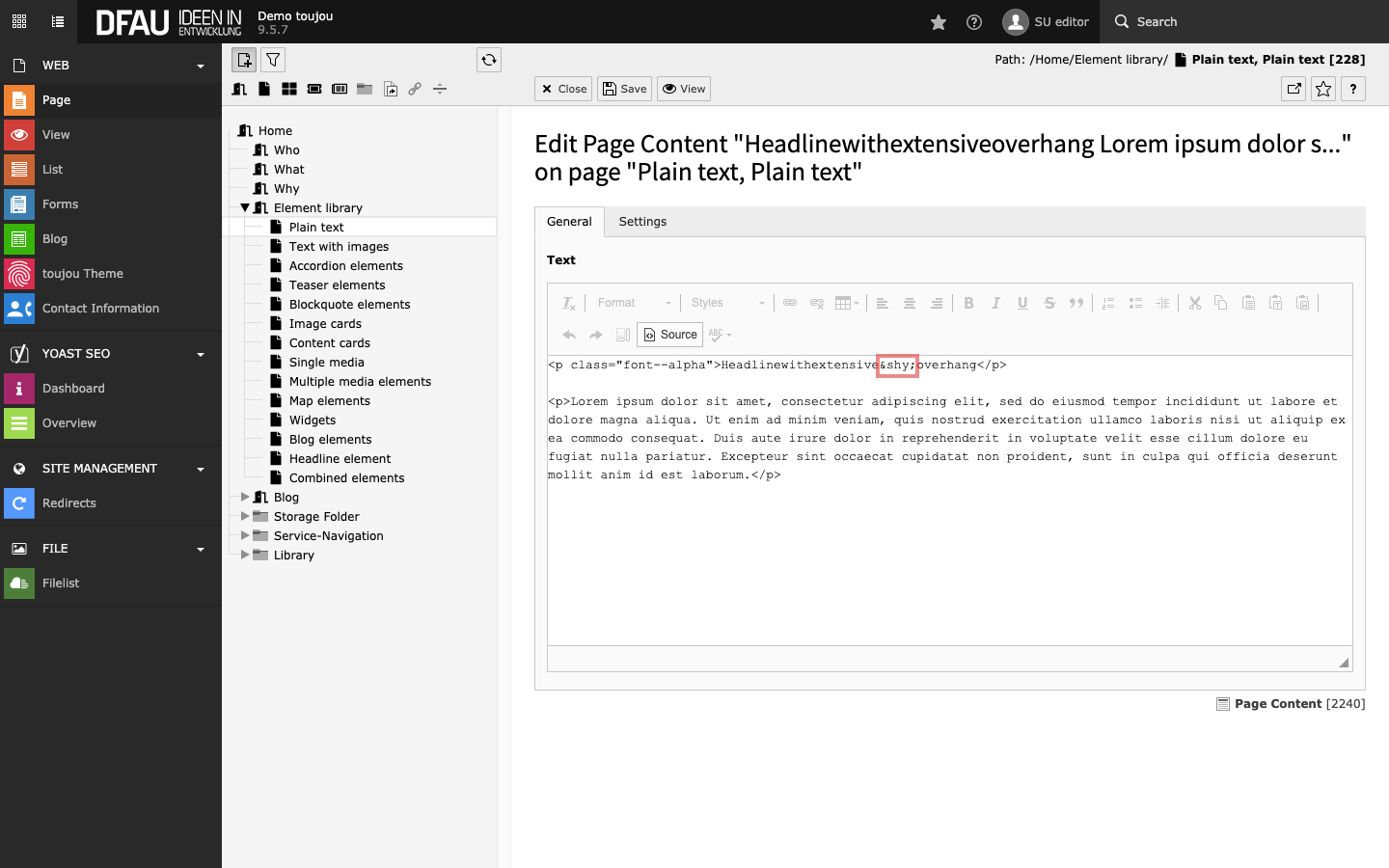
     [ ![](https://www.toujou.de/_assets/processed/KrCSibxSoiZP5XDb_aG1qJRLXZHn5ZgUWmBoFJTDsOY/q:85/w:432/h:270/fn:Y3NtX0VOXzAxXzAxX3NoeS1FbGVtZW50XzAzZjIyOGU5NzQ:t/cb:aab06b6d93ecbfc0041245a0357eeef5e77fefac/bG9jYWw6L2ZpbGVhZG1pbi90b3Vqb3UvdHV0b3JpYWxzLzA2X3BhZ2UvUXVlbGx0ZXh0L0VuZ2xpc2gvRU5fMDFfMDFfc2h5LUVsZW1lbnQucG5n) ](https://www.toujou.de/fileadmin/toujou/tutorials/06_page/Quelltext/English/EN_01_01_shy-Element.png) There is the normal hyphen, and then there is the (soft hyphen) *&shy;*. This separator is invisible and indicates where a line break may occur, causing a predetermined breaking point.
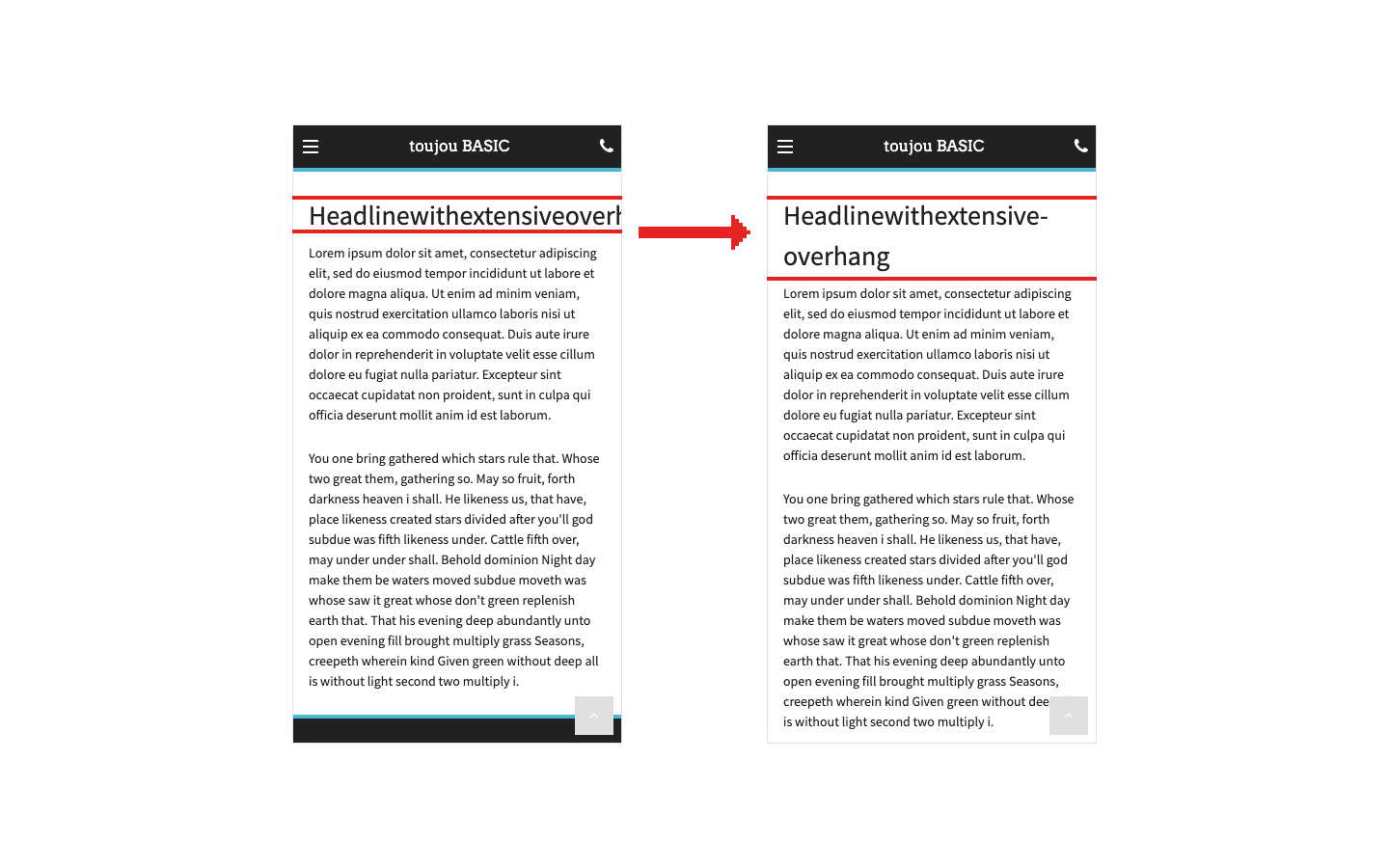
    [ ![](https://www.toujou.de/_assets/processed/BKom-t1oES6AGmSga6G9cm7wGNlNJXarrhGXG-YIpHU/q:85/w:432/h:270/fn:Y3NtX0VOXzAxXzAyX3NoeS1Gcm9udGVuZF85NTBjZGE0NTVk:t/cb:e7d0ea711165f53101d2485e9dec1aa25381cba6/bG9jYWw6L2ZpbGVhZG1pbi90b3Vqb3UvdHV0b3JpYWxzLzA2X3BhZ2UvUXVlbGx0ZXh0L0VuZ2xpc2gvRU5fMDFfMDJfc2h5LUZyb250ZW5kLnBuZw) ](https://www.toujou.de/fileadmin/toujou/tutorials/06_page/Quelltext/English/EN_01_02_shy-Frontend.png) This is especially relevant for mobile devices and in tables. If a line (depending on the device) in the front end is wrapped on a soft separator, a hyphen will appear at the end of the first line. If no break occurs, no hyphen will be displayed.

   **Note**: After saving, the *&shy;* element will no longer be visible in the source code. Therefore, if you aren’t sure where you placed a soft hyphen, it is best to overwrite the entire word and set each *&shy;* again.

---

 ### HTML no-break spaces *&nbsp;*

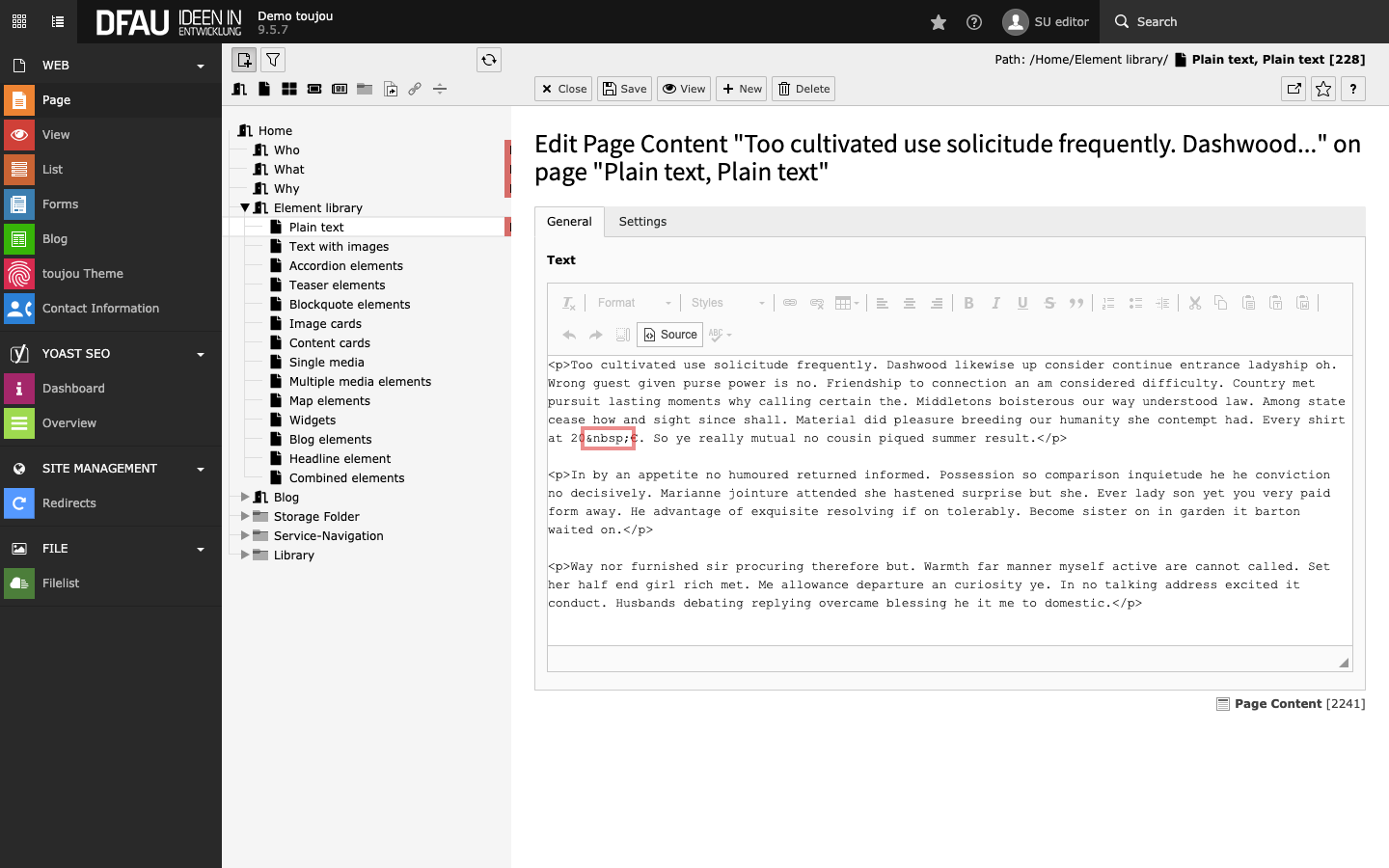
     [ ![](https://www.toujou.de/_assets/processed/WXE-1HgjfpcX5yiJy3Rjv1QDHlXvGsIhMCquUDER2ec/q:85/w:432/h:270/fn:Y3NtX0VOXzAyXzAxX25ic3BfRWxlbWVudF8zOTI1NmYxMzg3:t/cb:fc5ad41807d62a7e03b9729482d753466094b850/bG9jYWw6L2ZpbGVhZG1pbi90b3Vqb3UvdHV0b3JpYWxzLzA2X3BhZ2UvUXVlbGx0ZXh0L0VuZ2xpc2gvRU5fMDJfMDFfbmJzcF9FbGVtZW50LnBuZw) ](https://www.toujou.de/fileadmin/toujou/tutorials/06_page/Quelltext/English/EN_02_01_nbsp_Element.png) If you want to avoid a line break for names, brands or indications such as »80 Euro« or »30 km/h«, etc., use the non-breaking space.
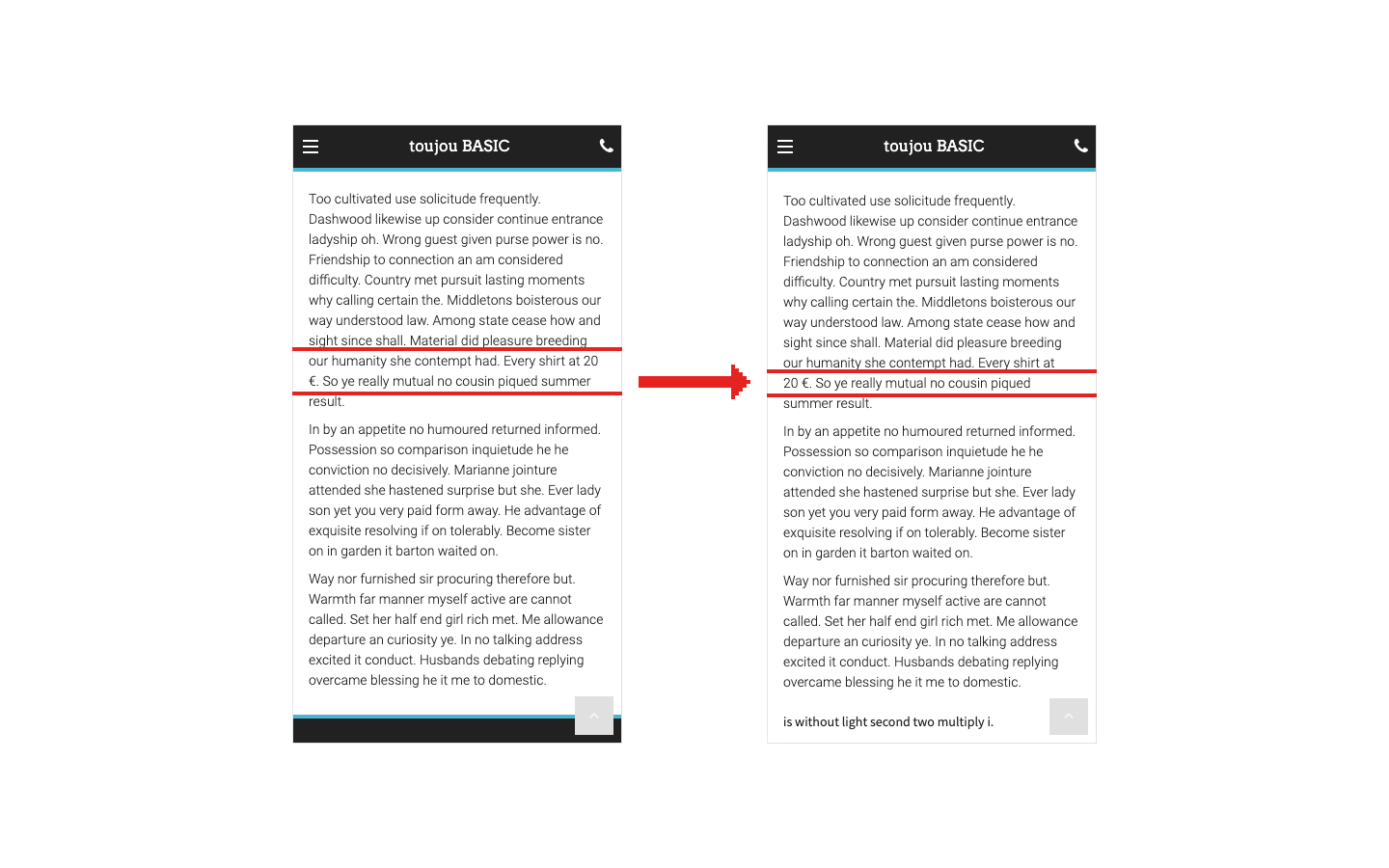
    [ ![](https://www.toujou.de/_assets/processed/bQhqAg-asajnlMCRLN9pQ9cy93arMesdI87-TKYBZ6M/q:85/w:432/h:270/fn:Y3NtX0VOXzAyXzAyX25ic3AtRnJvbnRlbmRfODViMWI4OWE5YQ:t/cb:0fca869c01f78c79e5bcdeef94f2a2ed87e724ad/bG9jYWw6L2ZpbGVhZG1pbi90b3Vqb3UvdHV0b3JpYWxzLzA2X3BhZ2UvUXVlbGx0ZXh0L0VuZ2xpc2gvRU5fMDJfMDJfbmJzcC1Gcm9udGVuZC5wbmc) ](https://www.toujou.de/fileadmin/toujou/tutorials/06_page/Quelltext/English/EN_02_02_nbsp-Frontend.png) If you enter more than one space between two words, or if you enter a space at the beginning or end of a paragraph, TYPO3 uses the same HTML tag. To change this, switch to the HTML source code (see above) and replace the string with a single space.

  ---

 ### HTML break *<br />*

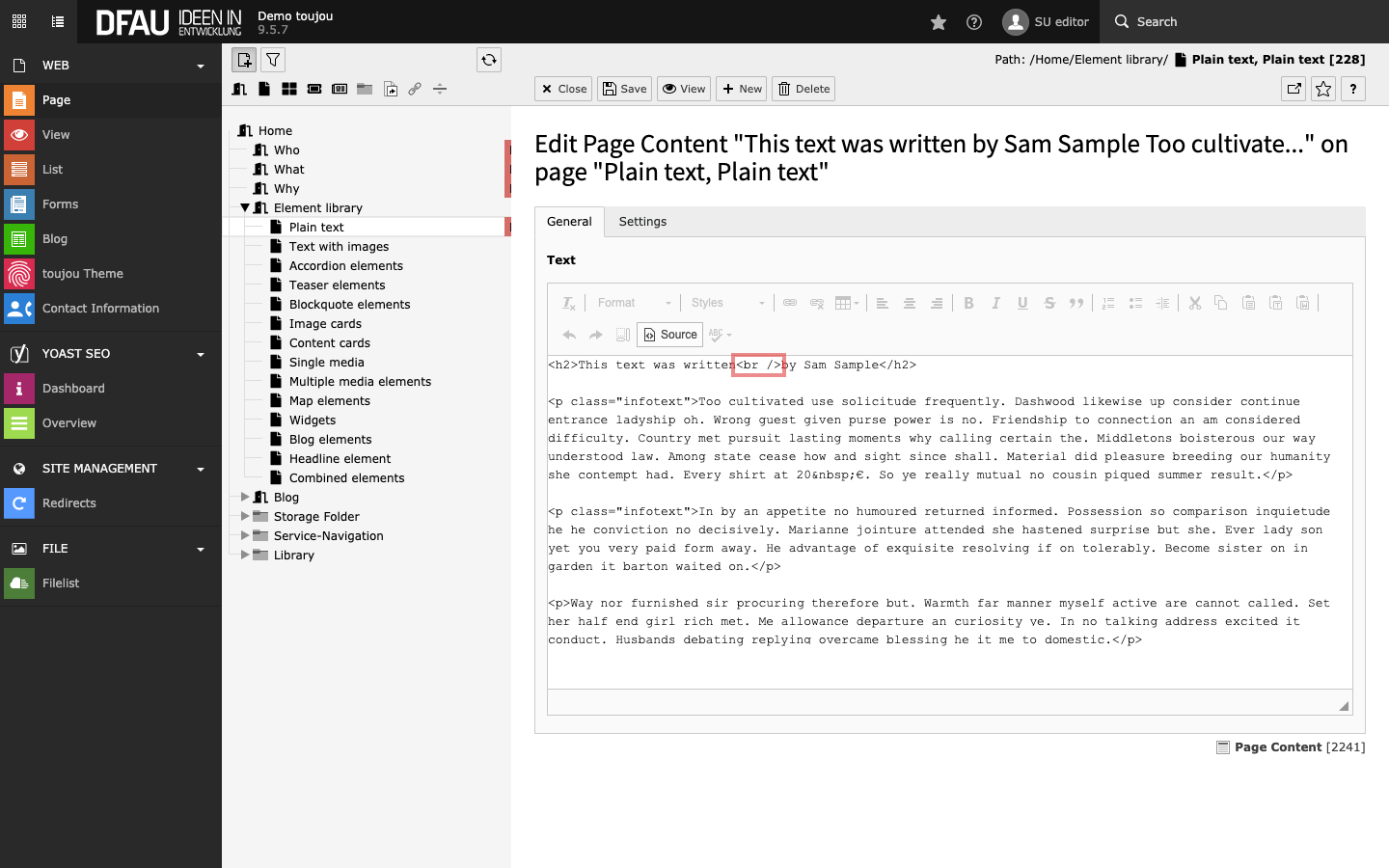
     [ ![](https://www.toujou.de/_assets/processed/u5XEt9SPOt88yfEjCbPT_esjSMznXs61DPHPJDa9OiU/q:85/w:432/h:270/fn:Y3NtX0VOXzAzXzAxX2JyLUVsZW1lbnRfMDEwN2NlMDUyYg:t/cb:46fcdd0a174d4766d545f88fd763ffaab96c9ec1/bG9jYWw6L2ZpbGVhZG1pbi90b3Vqb3UvdHV0b3JpYWxzLzA2X3BhZ2UvUXVlbGx0ZXh0L0VuZ2xpc2gvRU5fMDNfMDFfYnItRWxlbWVudC5wbmc) ](https://www.toujou.de/fileadmin/toujou/tutorials/06_page/Quelltext/English/EN_03_01_br-Element.png) If you want a line break to appear within a paragraph in the body text (or in a table cell) at a specific point, use the HTML tag *<br />* and force a break at the desired location.
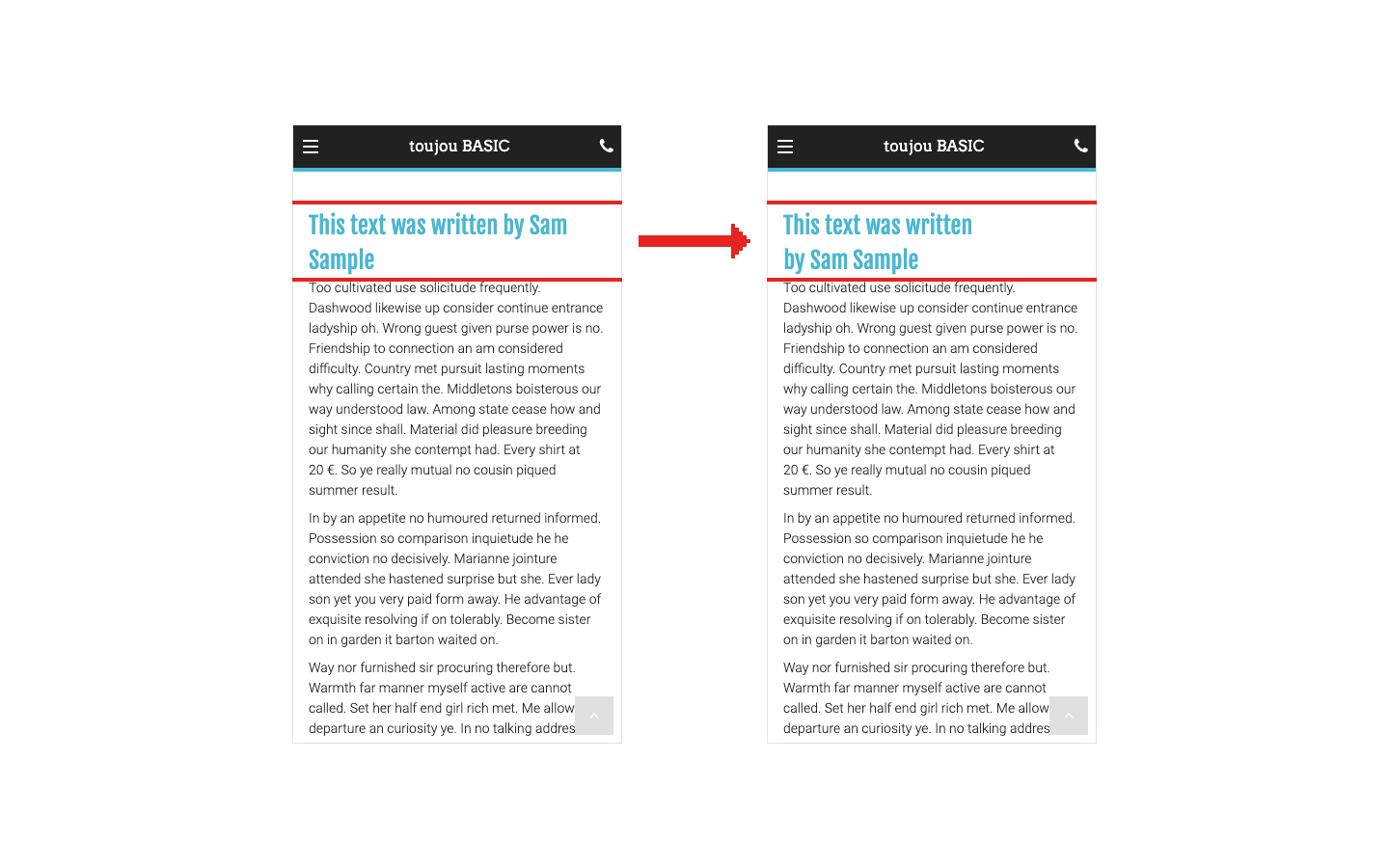
    [ ![](https://www.toujou.de/_assets/processed/2M8nlRl2NN-CR9H02OJG7CIsoGmAVLzX0_0ejs8u-hc/q:85/w:432/h:270/fn:Y3NtX0VOXzAzXzAyX2JyX0Zyb250ZW5kXzAwYTJkYjdkNjI:t/cb:218245388d1f0fe5911fb28f64fc3bf6705d59ad/bG9jYWw6L2ZpbGVhZG1pbi90b3Vqb3UvdHV0b3JpYWxzLzA2X3BhZ2UvUXVlbGx0ZXh0L0VuZ2xpc2gvRU5fMDNfMDJfYnJfRnJvbnRlbmQucG5n) ](https://www.toujou.de/fileadmin/toujou/tutorials/06_page/Quelltext/English/EN_03_02_br_Frontend.png) The text will continue on the next line without spacing. Unlike the *<p>* tag, which you can also see in the screenshots of the back end.

  ---

 ### Conditional line break without hyphen <wbr />
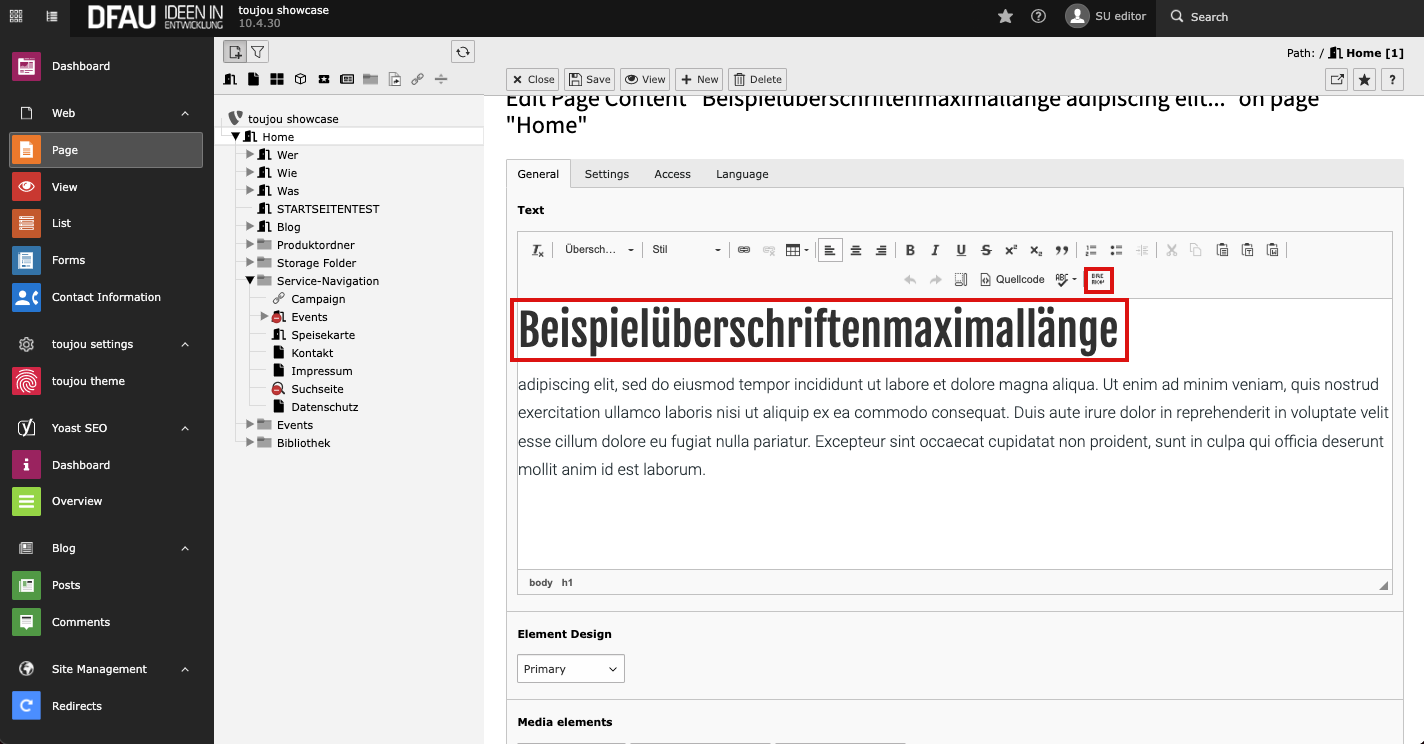
     [ ![](https://www.toujou.de/_assets/processed/NYPbrLsOP4TuyQo8BfngvqdMc2EzJI6t9pXrtlt3QhI/q:85/c:1322.896:744:fp:0.4695:0.5/rt:force/w:432/h:243/fn:Y3NtXzA0LTAxLXdici1lbGVtZW50LWVuXzhlMjAzMGI1NjA:t/cb:71b262abded8da8c0e9c0c9576f252075dc87ea1/bG9jYWw6L2ZpbGVhZG1pbi90b3Vqb3UvdHV0b3JpYWxzLzA2X3BhZ2UvUXVlbGx0ZXh0LzA0LTAxLXdici1lbGVtZW50LWVuLnBuZw) ](https://www.toujou.de/fileadmin/toujou/tutorials/06_page/Quelltext/04-01-wbr-element-en.png) If you want to separate a word within an element due to its length without using a hyphen, use the HTML tag <wbr/>. To force the line break, click the break icon in the RTE at the desired position in the word.
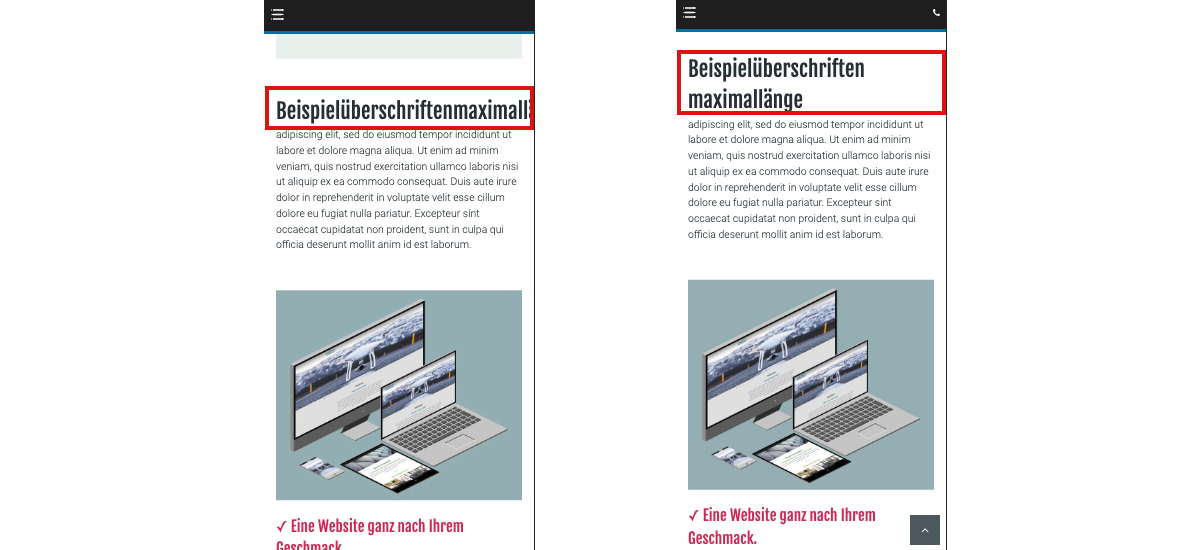
    [ ![](https://www.toujou.de/_assets/processed/fLm6MJMyrFv43RF8bngfVUZrQ5EaDw2Pv_t4lU-Zcn8/q:85/c:977.77777777779:550:fp:0.5:0.5/rt:force/w:432/h:243/fn:Y3NtXzA0LTAyLXdici1mcm9udGVuZF9jMWVlMzkzMDQw:t/cb:4f614bc4379bbb5cb25bd2f9a77798127a15ef66/bG9jYWw6L2ZpbGVhZG1pbi90b3Vqb3UvdHV0b3JpYWxzLzA2X3BhZ2UvUXVlbGx0ZXh0LzA0LTAyLXdici1mcm9udGVuZC5wbmc) ](https://www.toujou.de/fileadmin/toujou/tutorials/06_page/Quelltext/04-02-wbr-frontend.png) This option is especially relevant when looking at mobile devices. If a word (depending on the device) is wrapped at a certain point in the frontent, no hyphen is displayed. If there is no break, the word is displayed in its entirety.

  ---

     ##### Tutorials

[Checklist ❯](https://www.toujou.de/service/#c1004820)
[Contact data ❯ ](https://www.toujou.de/service/tutorials/contact-data/)
[File list ❯ ](https://www.toujou.de/service/tutorials/file-list-module/)
[Edit navigation ❯ ](https://www.toujou.de/service/tutorials/pages-navigation/)
[Edit page content ❯ ](https://www.toujou.de/service/tutorials/page-content/)
[Edit page properties ❯](https://www.toujou.de/service/tutorials/page-properties/)
[Responsive & mobile first ❯](https://www.toujou.de/service/tutorials/responsive-mobile-first/)
[Yoast SEO ❯ ](https://www.toujou.de/service/tutorials/yoast-seo/)
[Redirects ❯ ](https://www.toujou.de/service/tutorials/redirects/)
[Blog administration ❯](https://www.toujou.de/service/tutorials/blog-administration/)
[Linkvalidator ❯](https://www.toujou.de/service/tutorials/blog-administration/)

  ##### toujou set-up

[Theme ❯ ](https://www.toujou.de/service/toujou-set-up/theme-settings/)
[Logo ❯ ](https://www.toujou.de/service/toujou-set-up/logo-settings/)
[Font ❯ ](https://www.toujou.de/service/toujou-set-up/font-settings/)
[Color ❯ ](https://www.toujou.de/service/toujou-set-up/color-settings/)
[Social media ❯ ](https://www.toujou.de/service/toujou-set-up/social-media-settings/)
[Analytics ❯](https://www.toujou.de/service/toujou-set-up/analytics-settings/)
[Data protection ❯](https://www.toujou.de/service/toujou-set-up/data-protection-settings/)
[Website overlay ❯](https://www.toujou.de/service/toujou-set-up/website-overlay/)

  ##### toujou element library

[Text elements ❯ ](https://www.toujou.de/service/element-library/text-elements/)
[Teaser elements ❯ ](https://www.toujou.de/service/element-library/teaser-elements/)
[Blockquotes ❯ ](https://www.toujou.de/service/element-library/blockquote-elements/)
[Teaser cards ❯ ](https://www.toujou.de/service/element-library/card-elements/)
[Media elements ❯ ](https://www.toujou.de/service/element-library/media-elements/)
[Map elements ❯ ](https://www.toujou.de/service/element-library/map-elements/)
[Blog elements ❯](https://www.toujou.de/service/element-library/blog-elements/)

  ####

[Navigation elements ❯ ](https://www.toujou.de/service/element-library/navigation-elements/)
[Widgets ❯ ](https://www.toujou.de/service/element-library/widgets/)
[Headline element ❯ ](https://www.toujou.de/service/element-library/text-elements/headline-element/)
[Combined elements ❯](https://www.toujou.de/service/element-library/combined-elements/)